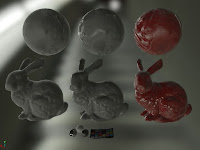
Achieving Anisotropy
Years back I worked out a method in Maya to bake arbitrary vector maps in tangent space for use as anisotropic or flow maps and a variety of HLSL shader methods to use them.
I've tested my maps in modified Heidrich–Seidel and Ward anisotropic shader models, but none of the BRDF methods.
The shader I've written to demo here is an indirect blinn-phong which bends the cube map lookup using a "tangent map".(which is what I'm calling the aforementioned bake vector map)
I proofed this work on a series of low poly balls(rounded box topology, see UV layout).
There are two sampling methods here, a single sampled cube map with warped lookup, the other uses 16 cube map samples with an offset lookup.
The multi-sample method would be too expensive for game play rates.
It's included here for quality comparison to the warped single sample method.


UV layout
Baking arbitrary vector maps in tangent space?
I'm sure a good graphics engineer could explain how sampling normals along a poly projected view matrix result in a tangent space normal map, but I don't think I'd understand or be able to roll my own.
So instead I use standard normal map baking by temporarily setting the surface normals to the whatever I want then baking normals.
For the low poly test case balls seen above, I used hi-poly spheres with the poles oriented in X and Y. Then set the vert normals on the hi res spheres to it's binormals in two of them and tangents in two of them. I could have rotated the UVs on two of them and used just binormals for all instead. Then ran a typical tangent space normal map baking process to get the tangent map seen above.
In the case of baking the hair tangent map seen below I baked one pass from hi-res hair geometry(which has uniform UV layout, so I could set the normal from the binormals) and another from a low res mesh with "combed" vectors***.
Aniso effect range 0 to 1-ish, there's no max range, but starts to look exaggerated past 1.

Brushed metal, carbon fiber, Christmas ornament example in different light probes


Burnished metal tangent map

Carbon fiber tangent map

Christmas ornament tangent map

Hair example with anisotropic indirect specular
For comparison, isotropic indirect specular
(i.e. texCUBE(sampler, -reflect(view, normal))
Tangent map baked from hi-res hair, which can be very noisy, so also blended with low res.
***What is "Combed" vectors?
Not sure how to get this done in 3d texture painting but vert color painting is pretty easy.
So "combed" vectors can be done by painting vert colors. The gist is getting the world space direction vector of the stroke, compressing the vector to 0-1 range and setting the vert color to that. Then I set the vert normals to the vert color, which is a direction vector, before baking tangent space normals.
To be clear I've written loads of scripts around temporarily setting the vert normals from various sources and baking. Also, the vert combing is part of a large hair authing toolset which is used at work, so can't share more then I had before starting work here.
I've tested my maps in modified Heidrich–Seidel and Ward anisotropic shader models, but none of the BRDF methods.
The shader I've written to demo here is an indirect blinn-phong which bends the cube map lookup using a "tangent map".(which is what I'm calling the aforementioned bake vector map)
I proofed this work on a series of low poly balls(rounded box topology, see UV layout).
There are two sampling methods here, a single sampled cube map with warped lookup, the other uses 16 cube map samples with an offset lookup.
The multi-sample method would be too expensive for game play rates.
It's included here for quality comparison to the warped single sample method.

Facet direction and sampling method notes.
UV layout
Baked tangent map with notes
Baking arbitrary vector maps in tangent space?
I'm sure a good graphics engineer could explain how sampling normals along a poly projected view matrix result in a tangent space normal map, but I don't think I'd understand or be able to roll my own.
So instead I use standard normal map baking by temporarily setting the surface normals to the whatever I want then baking normals.
For the low poly test case balls seen above, I used hi-poly spheres with the poles oriented in X and Y. Then set the vert normals on the hi res spheres to it's binormals in two of them and tangents in two of them. I could have rotated the UVs on two of them and used just binormals for all instead. Then ran a typical tangent space normal map baking process to get the tangent map seen above.
In the case of baking the hair tangent map seen below I baked one pass from hi-res hair geometry(which has uniform UV layout, so I could set the normal from the binormals) and another from a low res mesh with "combed" vectors***.
Aniso effect range 0 to 1-ish, there's no max range, but starts to look exaggerated past 1.

Brushed metal, carbon fiber, Christmas ornament example in different light probes

Carbon fiber tangent map

Christmas ornament tangent map

Hair example with anisotropic indirect specular
For comparison, isotropic indirect specular
(i.e. texCUBE(sampler, -reflect(view, normal))
Tangent map baked from hi-res hair, which can be very noisy, so also blended with low res.
Not sure how to get this done in 3d texture painting but vert color painting is pretty easy.
So "combed" vectors can be done by painting vert colors. The gist is getting the world space direction vector of the stroke, compressing the vector to 0-1 range and setting the vert color to that. Then I set the vert normals to the vert color, which is a direction vector, before baking tangent space normals.
To be clear I've written loads of scripts around temporarily setting the vert normals from various sources and baking. Also, the vert combing is part of a large hair authing toolset which is used at work, so can't share more then I had before starting work here.
Basic IBL Shaders in HLSL
Recently wrote a few shaders in HLSL, only indirect lighting but I think they turned out pretty successful.
I used CubeMapGen to process a specular and an irradiance cube map(16bit) for each HDR lighting probe.
For the specular cube map each lod is increasingly convolved(blurred) representing a range of specular reflection from smooth to rough.
The specular cube sampled using texCUBElod(texture,float4(reflection vector, lod)).
The material roughness drives the lod in this case.
(sorry forgot where I got this light probe from)
The irradiance cube map is the diffused version of the light probe.
It's sampled using texCUBE(texture, normal vector)
tangent space normal map
Opaque Shader
Seen in different light probes and material parameters.


Translucent Shader
Seen from the front and back in a bright and a dark lighting condition.
This uses an addition texture channel used to define thin and thick portions of the model.
The "translucency" is given by sampling the irradiance map in the inverse view coordinate.
float3 diffuse = (frontDiffuse * (1.0f - translucency)) + (backDiffuse * translucency);

Transparent Shader
For glass. Refraction is just the specular cube map along the refraction vector, but comes with the advantage of easy blurred refracted lighting using the texCUBElod function. Lod in this case is driven by "clarity". The yellow material here has a low clarity using lod ~3.5.

Anisotropic Shader
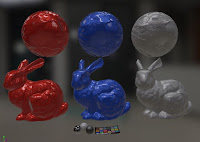
The specular reflection here is bent away from the eye in the axis of a tangent map. It's a "novel" approach for sure but is pretty good, particularly for micropatterns like the ones shown here; burnished metal and carbon fiber. The red christmas ball less so.
I'll post more on how this works, comparison, and how I author tangent maps.

Coated Shader
This one is pretty common but fun none the less. Uses an additional normal map for the under surface. See "fleck" normal maps below.


noise fleck
fiberglass fleck
I used CubeMapGen to process a specular and an irradiance cube map(16bit) for each HDR lighting probe.
For the specular cube map each lod is increasingly convolved(blurred) representing a range of specular reflection from smooth to rough.
The specular cube sampled using texCUBElod(texture,float4(reflection vector, lod)).
The material roughness drives the lod in this case.
(sorry forgot where I got this light probe from)
The irradiance cube map is the diffused version of the light probe.
It's sampled using texCUBE(texture, normal vector)
tangent space normal map
roughness map, where black would use the sharpest specular reflection(lod0), and white uses the blurriest(lod7 in this case)
Seen in different light probes and material parameters.
Translucent Shader
Seen from the front and back in a bright and a dark lighting condition.
This uses an addition texture channel used to define thin and thick portions of the model.
The "translucency" is given by sampling the irradiance map in the inverse view coordinate.
float3 diffuse = (frontDiffuse * (1.0f - translucency)) + (backDiffuse * translucency);
Translucent Map
Generated by inverting the mesh normals, baking AO, and inverting the result.
It's not depth in the view vector but approximates diffused depth.
Generated by inverting the mesh normals, baking AO, and inverting the result.
It's not depth in the view vector but approximates diffused depth.
Transparent Shader
For glass. Refraction is just the specular cube map along the refraction vector, but comes with the advantage of easy blurred refracted lighting using the texCUBElod function. Lod in this case is driven by "clarity". The yellow material here has a low clarity using lod ~3.5.
Anisotropic Shader
The specular reflection here is bent away from the eye in the axis of a tangent map. It's a "novel" approach for sure but is pretty good, particularly for micropatterns like the ones shown here; burnished metal and carbon fiber. The red christmas ball less so.
I'll post more on how this works, comparison, and how I author tangent maps.
Tangent Maps
Coated Shader
This one is pretty common but fun none the less. Uses an additional normal map for the under surface. See "fleck" normal maps below.
noise fleck
fiberglass fleck
Coffe Cup Models
Shapeways porcelain ceramic finish options can be found here.
Squat
Giant Espresso
Jay
Mod Diner
Soft Block
Block
Jay Octopus
Jay Urchin A
Jay Urchin B
Faux Lux
Polygonal
Soft Diner
Stine
Subscribe to:
Posts (Atom)